DoorDash vs Uber Eats vs Grubhub: App Interface Compared (2026)
The Short Answer
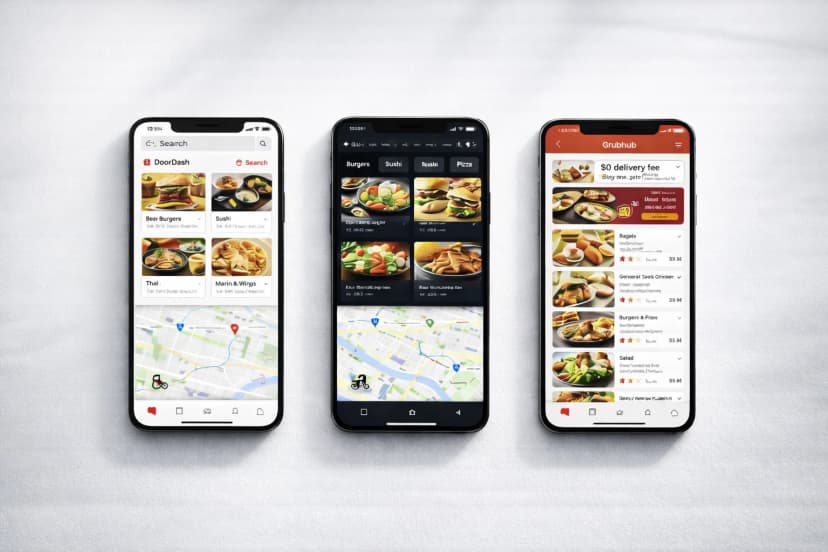
DoorDash's driver app has the clearest earnings dashboard and best map visualization.
Uber Eats integrates rideshare and delivery in one app, reducing screen-switching for drivers who do both — unique advantage no competitor matches.
Grubhub's scheduling interface is the most structured, making it the easiest for drivers who want to block specific hours in advance.
All three apps now support background audio navigation, but DoorDash and Uber Eats have better third-party GPS integration (Google Maps, Waze).
App crashes and GPS lag can happen on any of the three platforms, so keep your own mileage log (odometer readings at shift start and end) instead of relying on the delivery app's records.

See your real hourly rate after car costs.

Table of Contents
The delivery app you choose affects more than just pay rates: the driver interface determines how quickly you accept orders, how smoothly you get around, and how clearly you understand what you're actually earning. This is a hands-on comparison of all three driver apps as they exist in 2026, covering every major screen a driver sees during a typical shift.
Why the Driver App Interface Matters
An inefficient interface costs real money. If accepting an order takes 4 seconds instead of 1, you miss more orders during high-demand periods. If the earnings screen is buried two taps deep, you can't make informed decisions about when to log off.
DoorDash Driver App (Dasher App)
Home Screen and Map
The Dasher home screen centers on an animated map showing your current zone colored by demand intensity: red/orange for high demand, grey for slow. Peak Pay overlays appear directly on the map as dollar-amount badges, so you always know the current bonus without leaving the screen. This visualization is the clearest of the three apps.
Order Acceptance Flow
When an order arrives, DoorDash shows: restaurant name, pickup distance, delivery distance, estimated total pay (base + Peak Pay + estimated tip), and a countdown timer. Drivers can see the payout before accepting (a significant transparency advantage). The accept/decline buttons are large and thumb-accessible on all screen sizes.
Navigation Integration
DoorDash integrates with Google Maps, Waze, and Apple Maps. You can set your default navigation app in settings. The app passes the full address directly to your chosen navigation app, avoiding the need to copy-paste. In-app navigation exists as a fallback but most experienced drivers use Waze for real-time traffic data.
Earnings Dashboard
The Dasher earnings screen shows today's total, a weekly bar chart, and a breakdown by order (base pay, Peak Pay, tip separately). You can tap any completed order to see the full breakdown. The weekly earnings page also shows total miles driven for the period, useful for tax tracking, though it's not a substitute for a dedicated mileage log.
DoorDash App: Strengths and Weaknesses
Strengths: Best map visualization, transparent pre-acceptance pay display, clean earnings breakdown. Weaknesses: Occasional GPS signal lag on DoorDash's map view in tunnels and parking garages; challenge tracking requires switching to a separate screen.
Uber Eats Driver App (Driver App)
Home Screen and Map
Uber's driver app is unique in combining both rideshare and delivery requests on a single interface. The home screen map shows surge pricing hexagons (for rideshare) and Boost zone overlays (for Eats). Drivers toggle between delivery-only and delivery+rideshare mode with a single switch. This hybrid design is genuinely useful for drivers doing both services.
Order Acceptance Flow
Uber Eats order cards show restaurant name, approximate payout, and a countdown that is shorter than DoorDash's. The app does not show the full destination before acceptance in all markets (varies by city policy), which is a notable transparency gap. That said, Uber's algorithm tends to filter low-payout offers before they reach drivers.
Navigation Integration
Uber offers the best in-app navigation of the three platforms, with built-in turn-by-turn directions that don't require switching apps. Drivers can also choose Google Maps or Waze. The in-app navigation uses Uber's own routing data, which is particularly accurate in cities where Uber has deep trip history.
Earnings Dashboard
Uber's earnings screen shows gross earnings, Uber's service fee, and net pay by day and week. The Pro dashboard (accessible for Gold tier and above) adds fuel savings tracking and an estimated tax withholding reminder. Trip-level breakdowns are accessible but require more taps than DoorDash's equivalent.
Uber Eats App: Strengths and Weaknesses
Strengths: Best-in-class combined rideshare+delivery workflow, strong in-app navigation, surge zone visualization. Weaknesses: Short acceptance timer, incomplete pre-acceptance destination display in some markets.
Grubhub Driver App
Home Screen and Map
Grubhub's home screen is more structured than its competitors, reflecting the platform's scheduling-based model. When you're on a scheduled block, the app shows your active zone and estimated hourly earnings for the current period. Outside a block, the map is less dynamic and provides fewer real-time demand signals.
Order Acceptance Flow
Grubhub order cards show restaurant, pickup address, delivery distance, and estimated pay before acceptance, with a timer. The interface is clean and readable. One differentiator: Grubhub shows the guaranteed minimum for the current block prominently, which helps drivers understand their floor earnings.
Navigation Integration
Grubhub integrates with Google Maps and Waze. The handoff to the external navigation app is smooth. In-app navigation is available as a fallback but is less polished than Uber's built-in system.
Earnings Dashboard
Grubhub's earnings interface shows completed orders, tips, and mileage pay by shift and by week. The weekly summary is clean and easy to read, though it lacks the graphical presentation of DoorDash's bar chart. Scheduling history is accessible from the same screen, which is useful for tracking block utilization.
Grubhub App: Strengths and Weaknesses
Strengths: Best scheduling interface, clear guaranteed minimum display, clean order cards. Weaknesses: Less real-time demand visualization than competitors, weaker outside its core markets.
Side-by-Side App Feature Comparison
| Feature | DoorDash | Uber Eats | Grubhub |
|---|---|---|---|
| Order acceptance timer | Longer | Shortest | Medium |
| Pre-acceptance destination visible | Yes | Partial (market-dependent) | Yes |
| Pre-acceptance full pay visible | Yes | Estimate only | Yes |
| Demand heatmap | Excellent | Good (surge hexagons) | Basic |
| In-app navigation quality | Basic (use Waze) | Strong | Basic (use Waze) |
| Third-party GPS support | Google Maps, Waze, Apple Maps | Google Maps, Waze | Google Maps, Waze |
| Combined rideshare+delivery | No | Yes | No |
| Earnings breakdown detail | High (per-order itemized) | Medium | Medium |
| Scheduling system | Open dash + scheduled zones | Open anytime | Block scheduling |
Which App Has the Best Driver Experience?
For transparency: DoorDash shows the most information before you accept an order: full pay estimate, both addresses, and time estimate. This lets you make informed decisions about every order.
For flexibility: Uber Eats' combined rideshare+delivery interface is unmatched if you want to do both services without switching apps.
For scheduled workers: Grubhub's block scheduling system is the most structured and easiest to use for drivers who want to commit to specific hours.
One Problem All Three Apps Share
None of the three platforms provide IRS-compliant mileage logs. Their built-in mileage tracking records platform miles only, not the miles you drive to reach your first pickup or between orders from different platforms. For multi-app drivers, a separate mileage tracking app is essential. ShiftTracker logs every mile from the odometer readings you enter at shift start and end, with the start and end city filled in from your approximate location (no background tracking), creating an audit-ready log that works across all gig platforms.
Frequently Asked Questions
Which delivery driver app is easiest to use?
DoorDash's Dasher app is the easiest to use in this comparison because of its clear demand map, transparent pre-acceptance pay display, and detailed earnings breakdown. Uber Eats rates well for drivers who combine rideshare and delivery.
Does Uber Eats show the delivery address before you accept?
In some markets, Uber Eats shows only the approximate delivery direction and distance before acceptance, not the full address. This varies by city. DoorDash and Grubhub show the full destination in most markets.
Which app has the best GPS navigation for delivery drivers?
Uber Eats has the strongest built-in navigation. However, most experienced drivers on all three platforms prefer Waze for real-time traffic routing, which works well with DoorDash, Uber Eats, and Grubhub.
Founder of ShiftTracker. Lime LP for almost 4 years · 42,000+ tasks completed. Background in financial trading and behavioral optimization.
You Might Also Like
DoorDash Dasher Rewards and Driver Tiers Explained (2026)
Silver, Gold, Platinum — and what happened to Top Dasher. What each Dasher Rewards tier actually unl...
Can DoorDash Drivers See the Tip Before Accepting? (2026)
Dashers never see a line that says "tip: $8" — but the number on the offer screen already includes i...
Does DoorDash Take Out Taxes? 1099 Forms, Business Codes and What You Actually Owe
DoorDash withholds nothing from your pay: no federal tax, no Social Security, no Medicare. You owe 1...